By: Philippe Teuwen (@doegox)
White-box cryptography is a relatively new field that aims at enabling safely
cryptographic operations in hostile situations.
A typical example is its use in digital-right management (DRM) schemes, but
nowadays you also find white-box implementations in mobile applications such as
Host Card Emulation (HCE) and the protection of credentials to the cloud.
In all these use-cases the software implementation uses the secret key of a
third-party which should remain secret from the owner of the device which is
running this executable.
So far all published approaches to turn a symmetric cryptographic algorithm in a
white-box implementation have been broken, at least on paper.
However, all these cryptanalytic approaches require a detailed knowledge about
the white-box design used, which typically requires a painful
reverse-engineering effort of various obfuscation layers, followed by a
relatively high-level of expertise and a thorough understanding of the
scientific attack in order to successfully extract the private key.
And honestly I don’t understand much all those nerdy papers.
Let’s see if there is a way how to automate attacks without much effort.
The idea is to transpose well known smartcard power analysis attacks to the
white-box setup.
Indeed when one attacks a smartcard with those techniques he doesn’t care much
about the exact implementation details.
The key, so to speak, is to use dynamic binary instrumentation to record traces
of a few executions of the white-box implementation and make the obtained
information compatible with the power analysis techniques.
That’s what we call Differential Computation Analysis (DCA) in reference to the
Differential Power Analysis (DPA) used against cryptographic hardware.
Let’s take for example the white-box challenge that Brecht Wyseur put
online in 2007.
It’s a GNU/Linux command-line binary (a Windows version is available too) called
wbDES, which encrypts a single plaintext block with a fixed key:
./wbDES 11 22 33 44 55 66 77 88
INPUT: 11 22 33 44 55 66 77 88.
OUTPUT: c4 03 d3 2e 2b c6 cf ee.
Oh but wait, we need tools…
Isn’t the coming talk
Hiding your White-Box Designs is Not Enough
at Troopers16 the perfect occasion for a release?
So here we go: SideChannelMarvels is
the new home of an awesome set of tools! (I can say so because it’s the
contribution of many people, not just me 😉 )
More features and more white-boxes will come soon but, well, it’s a start…
First step is to trace the executable so it’s naturally in the
Tracer repository that we’ll
find ammunitions. TracerGrind is an instrumentation plugin for Valgrind while
TracerPIN is one for Intel PIN.
TraceGraph is a GUI to visualize execution traces.
In this example we’ll start with TracerPIN and TraceGraph.
We could jump directly to the attack but it’s always nice to have some visual
support, which is especially useful to find the sweet spot where the actual
crypto is activated in larger binaries.
Once it’s installed, acquiring an execution trace is as easy as:
Tracer -t sqlite -- ./wbDES 11 22 33 44 55 66 77 88
The trace, containing all the executed instructions, read and written data and
their addresses, is now in a database.
To have a quick overview of what’s happening, we’ll use TraceGraph, the third
tool of that repository.
tracegraph &
From there you can connect to the local database and open our fresh trace. After rescaling with the “Overview zoom” command you’ll get something like this:

The execution goes from top to bottom, the horizontal axis being the memory
address range. We see on the left the instructions in black looping while
reading quite a lot of data somehow linearly, shown in the green diagonal, while
on the far right things happen on the stack.
Let’s zoom on the stack:
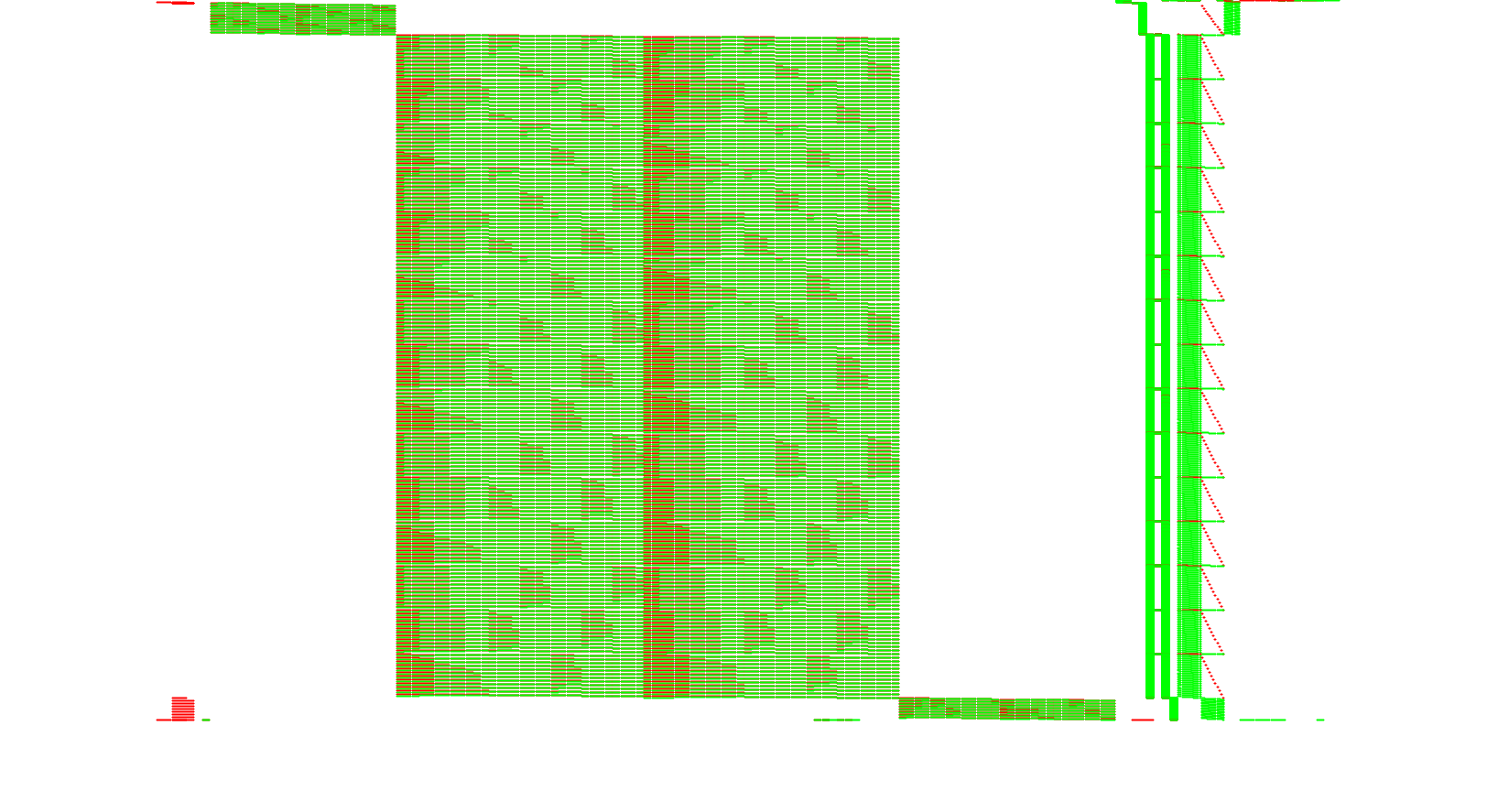
Now the DES rounds are visible. To perform the DCA attack, one needs to collect several traces during the first or the last DES round. In large or slow implementations TraceGraph is helpful to define a range to target only e.g. the first round but our example is so small that we can blindly trace the entire execution.
Acquisition of traces is made easy with some script available in the
Deadpool repository.
The scripts configured for this challenge are in
Deadpool/wbs_des_wyseur2007/DCA.
The configuration is typically limited to: specifying the executable to attack,
how to provide plaintexts to the target, how to read the ciphertexts back, how
many traces you want, what to trace (here the addresses of the data being read
from memory), and if you prefer to use Valgrind or PIN.
So just run it:
./Tracer2bin.py
The traces will be attacked by our last tool in the Daredevil repository. To convert them to a compatible format and generate automatically a configuration file, run:
./bin2daredevil.py
There is also another script ./bin2trs.py in case you want to import the traces in Riscure Inspector tool.
daredevil -c addr8_r_50_72072.config
[CONFIGURATION]
[GENERAL]
Number of threads: 8
Index first sample: 0
Number of samples: 72072
Total number traces: 50
Target number traces: 50
Total number keys: 64
Attack order: 1
Return Type: d
Window size: 0
Algorithm: DES
Round: 0
Bytenum: all
Target all bits individually.
Secret Key: 0x30 32 34 32 34 36 32 36
Round Key: 0x14 02 32 2c 31 20 0f 07
Lookup table layout: [8x64]
Memory: 4.00GB
Keep track of: 20
Separator : STANDARD
[TRACES]
Traces files: 1
Traces type: i
Transpose traces: True
Total number samples: 72072
Traces:
1. addr8_r_50_72072.trace [50x72072]
[GUESSES]
Guesses files: 1
Guesses type: u
Transpose guesses: True
Total columns guesses: 8
Guesses:
1. addr8_r_50_72072.plain [50x8]
[/CONFIGURATION]

[INFO] Lookup table specified at LUT/DES_SBOX
[ATTACK] Computing 1-order correlations...
[ATTACK] Key byte number 0
[ATTACK] Target bit number 0
[ATTACK] Target bit number 1
[ATTACK] Target bit number 2
[ATTACK] Target bit number 3
[INFO] Attack of byte number 0 done in 0.445844 seconds.
Best bit: 0 rank: 0. -1 0x14 5661
[ATTACK] Key byte number 1
[ATTACK] Target bit number 0
[ATTACK] Target bit number 1
[ATTACK] Target bit number 2
[ATTACK] Target bit number 3
[INFO] Attack of byte number 1 done in 0.377872 seconds.
Best bit: 0 rank: 0. -1 0x2 4552
[ATTACK] Key byte number 2
[ATTACK] Target bit number 0
[ATTACK] Target bit number 1
[ATTACK] Target bit number 2
[ATTACK] Target bit number 3
[INFO] Attack of byte number 2 done in 0.415788 seconds.
Best bit: 1 rank: 0. -1 0x32 5685
[ATTACK] Key byte number 3
[ATTACK] Target bit number 0
[ATTACK] Target bit number 1
[ATTACK] Target bit number 2
[ATTACK] Target bit number 3
[INFO] Attack of byte number 3 done in 0.378048 seconds.
Best bit: 0 rank: 0. 1 0x2c 2920
[ATTACK] Key byte number 4
[ATTACK] Target bit number 0
[ATTACK] Target bit number 1
[ATTACK] Target bit number 2
[ATTACK] Target bit number 3
[INFO] Attack of byte number 4 done in 0.387388 seconds.
Best bit: 0 rank: 0. 1 0x31 3140
[ATTACK] Key byte number 5
[ATTACK] Target bit number 0
[ATTACK] Target bit number 1
[ATTACK] Target bit number 2
[ATTACK] Target bit number 3
[INFO] Attack of byte number 5 done in 0.414127 seconds.
Best bit: 0 rank: 0. 1 0x20 4608
[ATTACK] Key byte number 6
[ATTACK] Target bit number 0
[ATTACK] Target bit number 1
[ATTACK] Target bit number 2
[ATTACK] Target bit number 3
[INFO] Attack of byte number 6 done in 0.369766 seconds.
Best bit: 0 rank: 0. 1 0xf 3543
[ATTACK] Key byte number 7
[ATTACK] Target bit number 0
[ATTACK] Target bit number 1
[ATTACK] Target bit number 2
[ATTACK] Target bit number 3
[INFO] Attack of byte number 7 done in 0.426797 seconds.
Best bit: 0 rank: 0. 1 0x7 4642
[INFO] Total attack of file LUT/DES_SBOX done in 3.221978 seconds.
Here we already provided the correct DES key in the configuration file and the
tool returned the rank of each of the correct 6-bit round key bytes amongst all
the key candidates.
50 traces are largely enough to rank the correct key bytes in first position
(rank=0). Comparatively, we talk about hundreds of thousands of traces when
attacking smartcards…
To demonstrate an attack without knowing the key, one can edit the generated
addr8_r_50_72072.config file to comment out the correct key and choose which
6-bit key byte to break (e.g. bytenum=0 to attack the first DES S-Box).
Run again the attack:
...
[ATTACK] Computing 1-order correlations...
[ATTACK] Key byte number 0
[ATTACK] Target bit number 0
[INFO] 4612608 correlations computed in total.
[INFO] Global top 20 correlations.
-1 0x14 5661
-1 0x14 7167
-1 0x14 7166
1 0x14 7135
-1 0x14 7133
1 0x14 7132
-0.9226 0x14 5821
0.780625 0x14 7230
0.747048 0x14 5662
0.706687 0x7 6764
0.706687 0x7 4924
-0.706687 0x7 4925
0.706687 0x7 4926
0.706687 0x7 4927
0.706687 0x7 6765
-0.706687 0x7 6766
0.706687 0x7 4990
0.706687 0x7 4957
-0.679487 0x14 7292
0.672838 0x38 3000

Rank Correlation Key Sample(s)
0. -1 0x14 5661
1. 0.706687 0x7 4924
2. 0.672838 0x38 3000
3. -0.656432 0x1d 5821
4. 0.642383 0x36 16828
5. -0.628188 0x16 16828
6. -0.60969 0x1 48189
The first key byte of the first round key is, according to the tool: 0x14.
Repeating the attack on the other S-Boxes reveals that the 6-bit keys of the
first round are 14:02:32:2c:31:20:0f:07 and the corresponding DES key is
3032343234363236 because, yes, DES key scheduling is invertible.
Verification:
echo 11 22 33 44 55 66 77 88|xxd -r -p|openssl enc -e -des-ecb -nopad -K 3032343234363236|xxd -p
c403d32e2bc6cfee
Right now Daredevil doesn’t attack yet all key bytes at once automatically so
you’ve to break them one by one. But things will evolve, so expect the
instructions and features of the tools to change soon, stay tuned!
If you like this kind of unconventional approach and want to learn more, come
and see
my talk at Troopers16,
there are more white-boxes to break!
See you there!
Phil