Last year on the Hex-rays plugin Contest the Dynamic IDA Enrichment (DIE) plugin won first place, so we decided to have a look and play around with it.
DIE extends IDA to add Dynamic Data to the static analysis. So after the installation, we are able to perform the static analysis using a lot of supporting information from the actual execution of the binary under assessment.
Since DIE is purely written in Python you will need at least Python 2.7 and IDA Versions prior to 6.8 won´t work. In the current version DIE will only work on Windows which will hopefully soon be available cross-platform.
To setup the environment for DIE just use pip install –r requirements.txt
(requirements.txt are shipped with DIE).
Copy die_proxy.py to the IDA Plugin directory and add an environment Variable
named DIEDIR including the path to the DIE directory.
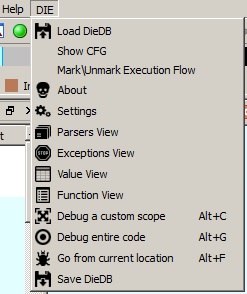
Loading up IDA with a Binary you will get a new sub-menu just for DIE
Now that we’re up and running let’s see how DIE can benefit/enhance static
analysis.
We will use a small binary asking for a password (with a static password inside
the binary, which is just slightly obfuscated) as an example.
Using only static analysis, we would dive through the different sub-routines eventually seeing the obfuscated code which is checking the password. Depending on the obfuscation, understanding the code can take a while. Many of us would use a debugger in addition to save some time. This is one thing DIE can do for us:
Just mark a location where you think it will hit the password algorithm for sure and press “Go from current location” or press Alt+F. The IDA Debugger loads up and runs through the program till it either finishes or asks for some sort of password input in our case. After submitting the password and the program exits, DIE will finish the analysis and the “Value” [Value View] and “Function” [Function View] View will be populated: It lists every value (i.e. data) or Functions which was processed during the execution of the program. This will as well help to filter out only the relevant Functions for our cause and ignoring every other functionality of the program.

While the Dynamic analysis runs, I did used password “test” which was obviously wrong but will help with finding the real password.
When looking at the analysis of the “Value”, you will see a lot of produced strings from Dynamic Debugging. Depending on the size of Code, there can be a high number of different strings which need to be checked as a potential password. After searching a bit there seems to be a potential password, which is “thisismypassword”(Highlighted in the screenshot).
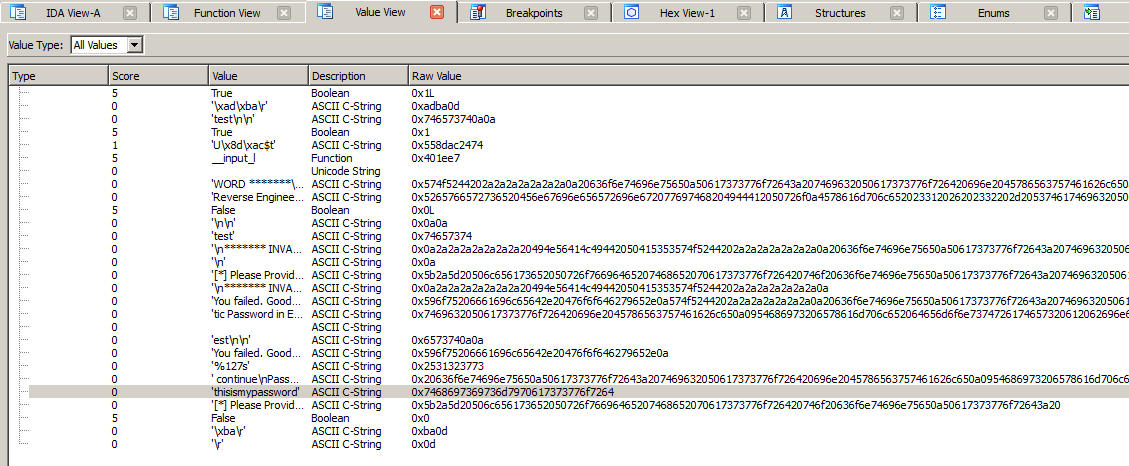
Value View (Click to Enhance)
In our case it seems that the password is pretty obvious but DIE offers some more functionality to proof that our guessed password “thisismypassword” is the correct one. You can double-click on the line inside of the “Value” view and you will land inside of the Function View. This will open the corresponding Function including the trace.

Function View (Click to enhance)
This will as well show which parameters the function got (in our case _strcmp)
and inside of which function this was called (sub_4011C0+0x68L). The parameters
leaves us without a doubt since “test” was my password input which was compared
to the correct password.
https://vimeo.com/130815897
But DIE can do even more for us: Another cool thing is resolving indirect calls
which can happen with VTables. In just static analysis you wouldn’t be able to
correctly resolve every xref inside of IDA.
This Video will show how much more information on xrefs you will get after the
dynamic analysis for that specific path you did choose while debugging.
https://vimeo.com/130815898
One more notable thing is the API which DIE adds to the python scripting inside
of IDA. It will deliver the complete Database of the dynamic analysis for
scripting which can help in a lot of cases.
Just as an example you can use python to Filter out functions without string
return parameters and sort them by xrefs which will crank out the most called
function without returning a string. This sort of function could be the
obfuscation algorithm of malware – resulting in a lot of saved time for certain
tasks:
https://vimeo.com/130815899
To conclude it on a personal level, I really do like what DIE offers for the
Analysis in IDA since I am not a big fan of the IDA Debugger. I rather use
Windbg or Immunity while doing the static analysis in IDA. I really think DIE
adds a lot more valuable information to the blob of some very big binarys in
IDA. We just have to keep in mind that the described approach involves executing
the binary under analysis – something to keep especially in mind for malware
analysis 😉
If you are interested in using IDA even more (and learn a lot about
exploitation), you should also have a look at our upcoming Troopers training on
Windows and Linux Exploitation!
Stay tuned,
Birk